Lightweight setup · Controlled access · No central server required
Linux / Unix · Python 3.10–3.13 · GPL-3.0
● ● ● autond / operator console
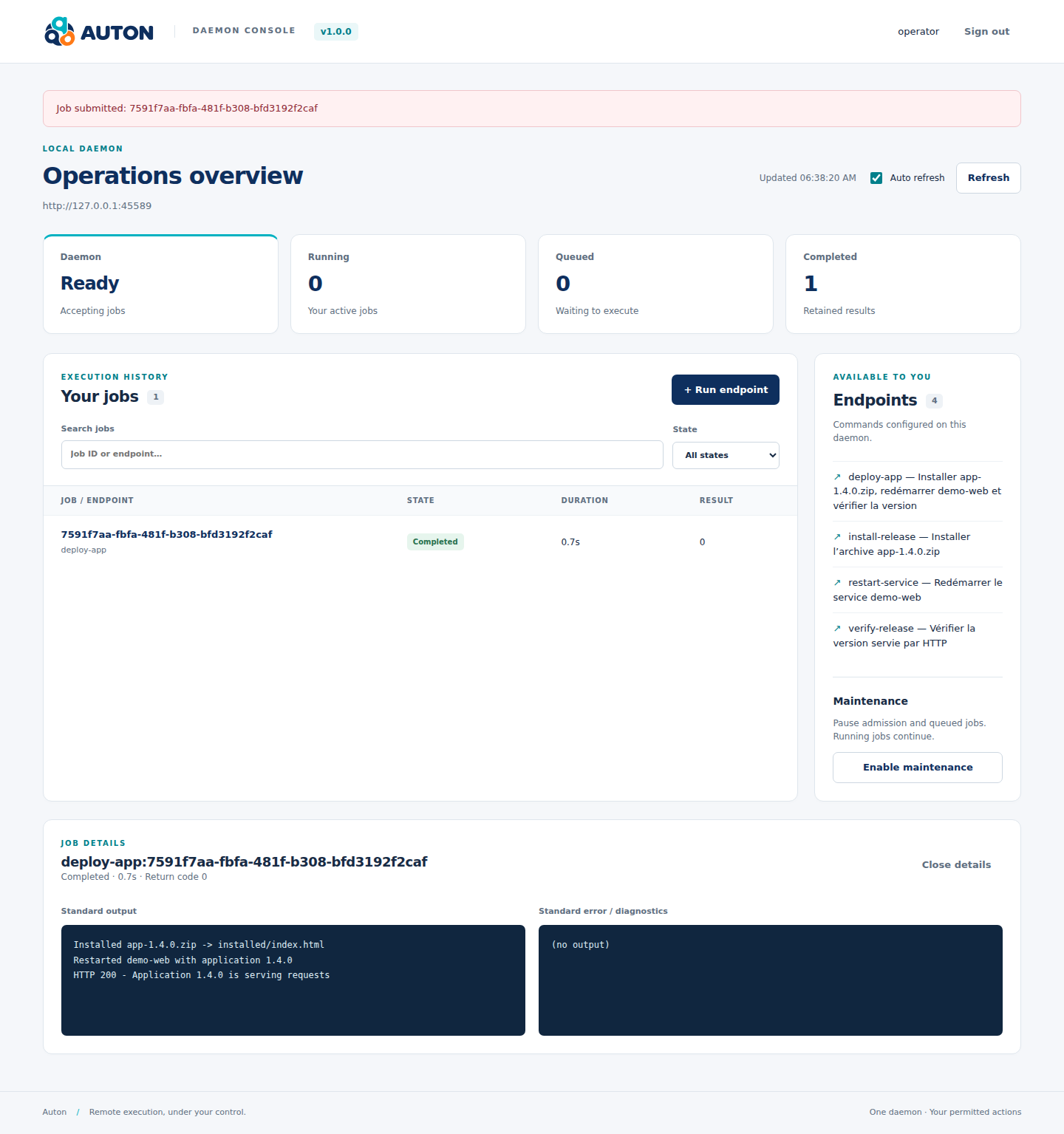
The web console: choose an operation and check its result.
TWO COMPONENTS, CLEAR ROLES
Run operations remotely. No central server required.
A small service on each machine receives requests over HTTP(S) and checks which operations are allowed. From your terminal or CI pipeline, the client contacts your chosen machines directly. Deploy an application, run a backup or restart a service using your existing scripts.
01 / CLIENT
auton
Use the command line in your scripts and CI/CD, or the interactive terminal interface to choose machines, browse allowed operations and prepare scenarios.
auton --tui --tui-ui textual -c inventory.yml \
  -t production
Install this standalone Python service on each target machine. It checks permissions, runs configured commands and stores results locally. It provides an HTTP API and an optional web console.
Operation discovery filtered by access rules
Tokens and sessions stored in SQLite
Local history and JSONL logs
One machine or several
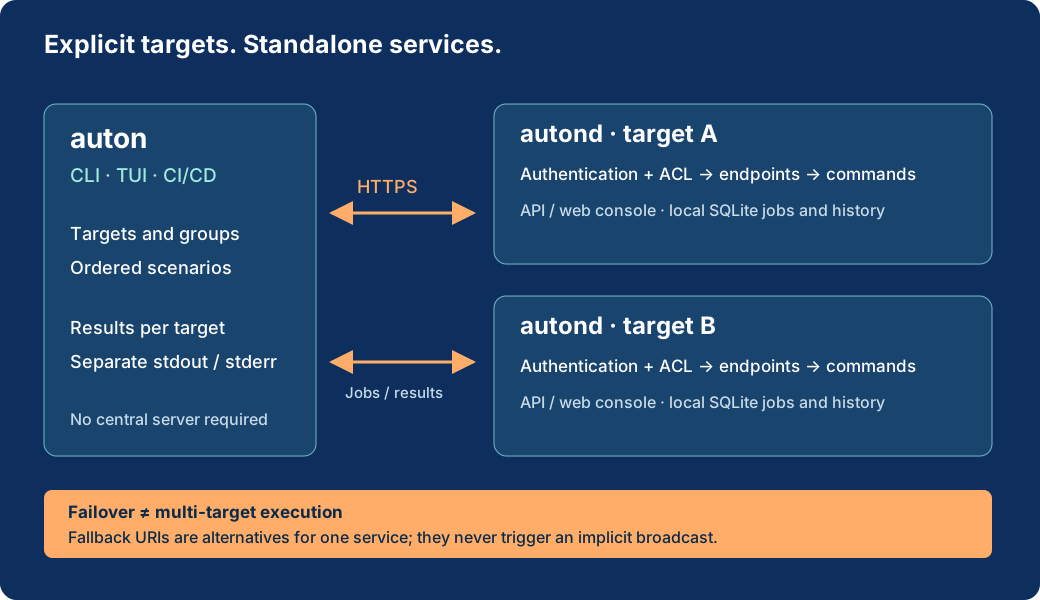
Define targets and groups in YAML. Choose explicitly when to run on multiple machines; each keeps its own results and output.
Clear step-by-step scenarios
Chain named steps together. A failed step stops the following steps on that target. Other targets keep their own results.
Careful failover
A failover list names alternatives, not multiple execution targets. If a network failure leaves a POST outcome uncertain, Auton never retries it automatically.
HOW REQUESTS FLOW
The client selects. Each service checks.
The auton client prepares targets and scenarios. Each autond service checks access, runs its configured operations and stores results locally.
Open the full-size architecture diagram. A failover chain remains a list of alternatives.
AN EXECUTION, STEP BY STEP
Deploy an application from the web console.
The deploy-app operation runs a script: it installs an archive, restarts a small web service and checks the version served. These commands really execute in a disposable local environment.
Here, the web console runs one script as a single job. The multi-target scenario below is driven by the auton client and keeps a separate job for each step.
Silent video with on-screen explanations · disposable environment · no publicly accessible execution service.
Read the video steps
Sign in to autond with an operator account.
Choose the allowed deploy-app operation.
Prepare deployment of demo application 1.4.0.
Review and explicitly confirm execution.
Read the final status and job output.
SEE IT IN ACTION
One scenario. Two targets. Separate results.
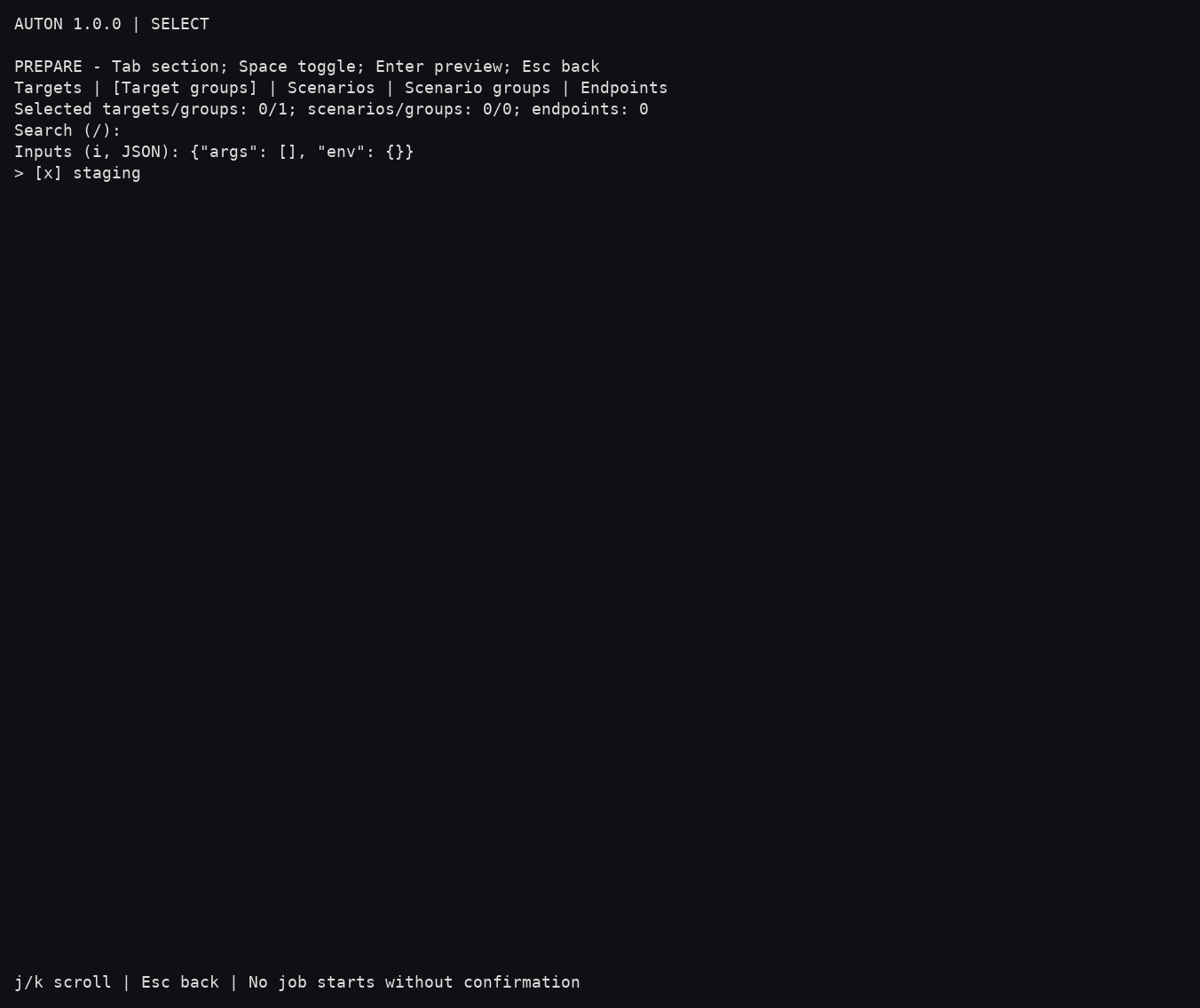
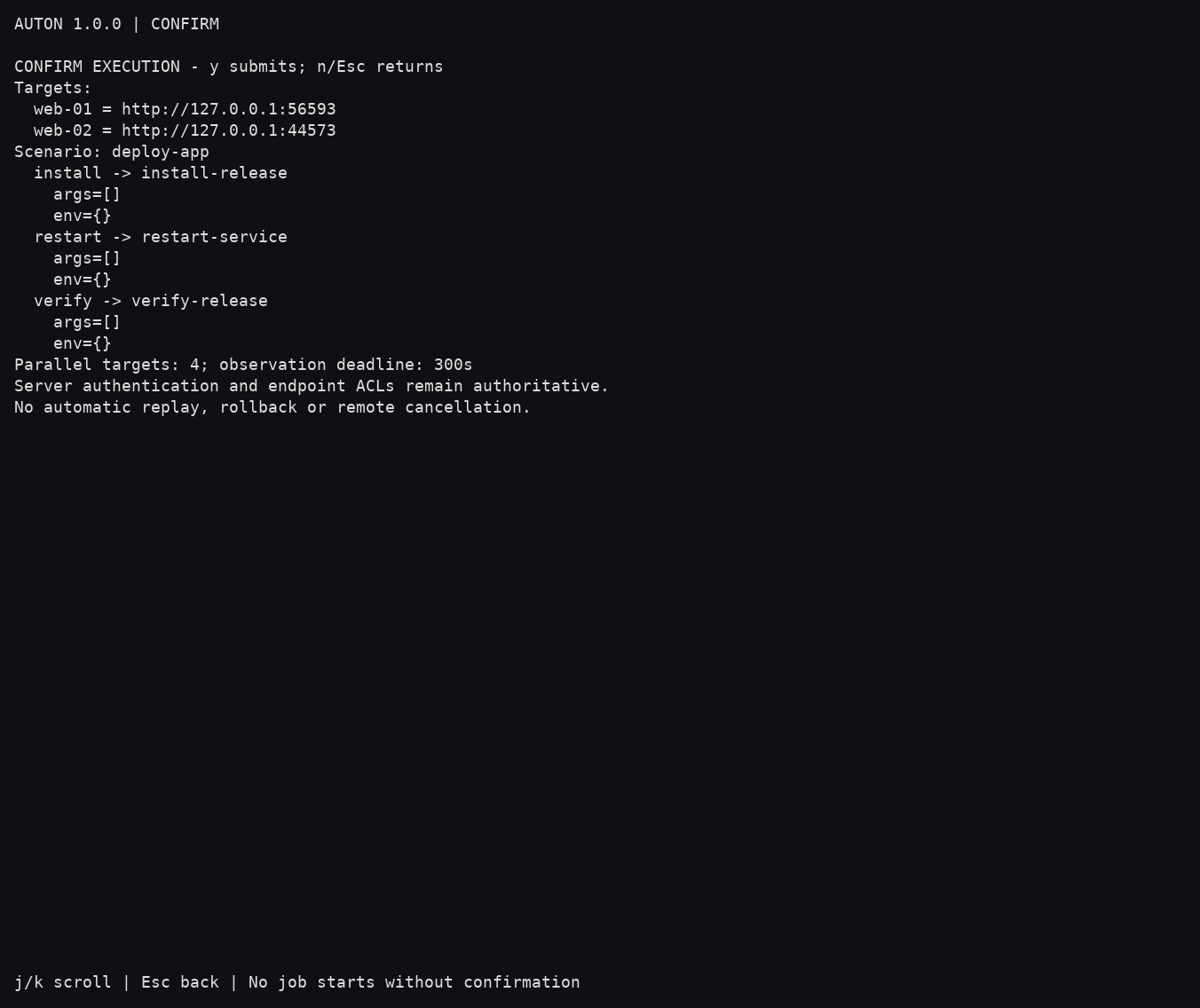
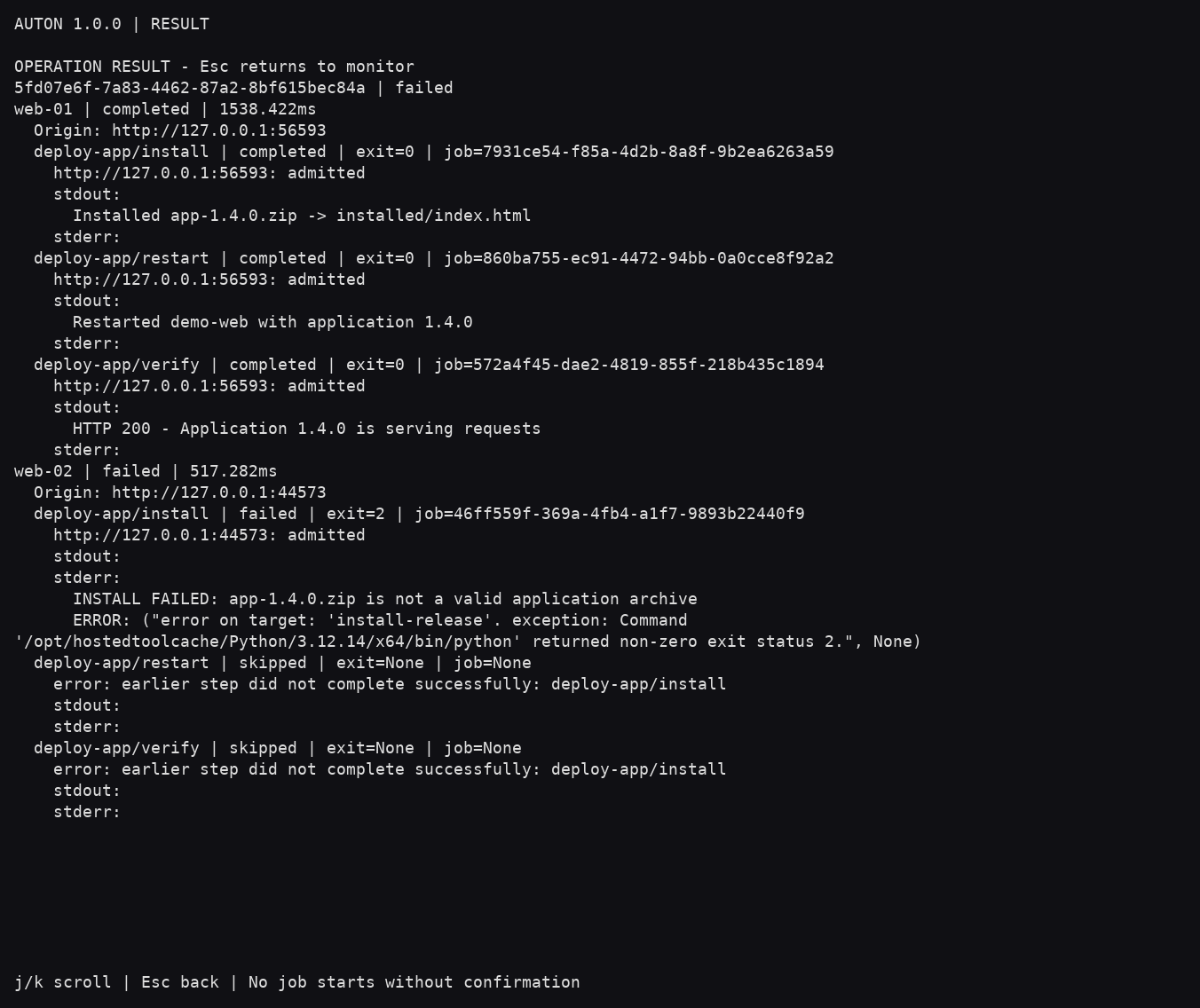
In the terminal interface, the staging group contains web-01 and web-02. The deploy-app scenario chains three jobs per target: install → restart → verify. A deliberately corrupted archive on web-02 shows why later steps are skipped on that target. Open the screenshots to see the details.
01InstallOne archive, one version.
02RestartActivate the new application.
03VerifyCheck the version actually served.
1 · Choose your targets: staging contains web-01 and web-02.2 · Confirm deploy-app: install the archive, restart the service, check the version.3 · Read each result: web-01 is deployed; an invalid archive stops later steps on web-02.4 · On one service: run deploy-app and read its output in the web console.
GET STARTED
Lightweight setup. Python or Docker.
Install the client with pip install auton==1.5.3 and the service with pip install 'autond[auth]==1.5.3', then configure its operations and access rules. The Docker steps shown here set up a local environment with authentication and SQLite; the port is bound to your machine only.
git clone https://github.com/decryptus/auton.git
cd auton
git checkout 0916ea4b3e730945235c7976ef5d24553d4d52f4
docker compose build
docker compose run --rm --no-deps \
  --entrypoint autond-auth auton \
  -c /etc/auton/auton.yml user set \
  -u operator -s read -s run -s maintenance
docker compose up -d
Choose your password, open http://127.0.0.1:8666/ui/, then run hello.
AUTOMATION
Fits into your CI/CD.
Keep your inventory in version control, tokens in private files and results separate for each target. Every service enforces its own access rules.
Use HTTPS for remote connections, credentials bound to each origin, and server-side scopes and access rules. Maintenance mode blocks new jobs; commands already running finish.
Persistent history does not replay interrupted jobs. Command execution is not a sandbox.